See Your Entire Workday,
At a Glance
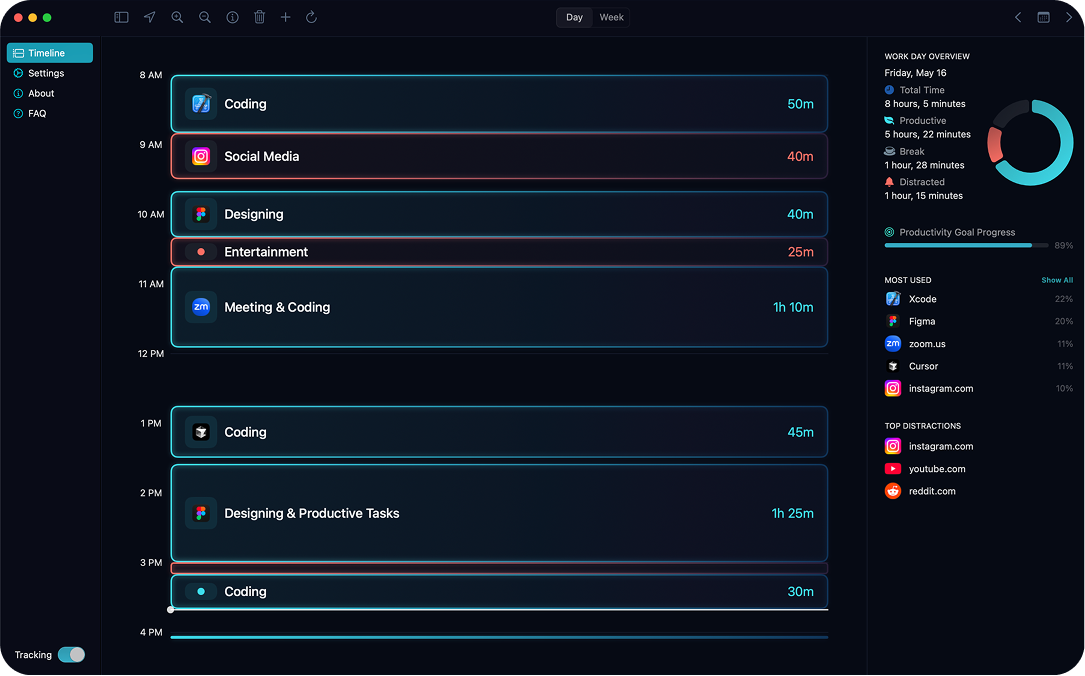
Toki silently tracks every app, tab, and session in the background automatically. Just open it and see where your time actually went.

Loved by 520+ professionals
Everything you need to improve your workflow
No setup. No configuration. Just insight.
Fully Automatic Tracking
Toki runs quietly in the background, detecting every app, and website with zero manual input.
Real-Time Insights
Toki generates a color-coded timeline that shows exactly how you spent every hour, updated in real time.
Productivity Analytics
Toki identifies your most productive hours, top apps, and distracting habits, giving you the data to work smarter, not just harder.
Private & Secure
Toki processes everything locally on your device. There is no back-end. Your timeline is yours alone.
iCloud Sync
Work across multiple Macs? Toki syncs your data securely through private iCloud so your timeline is always up to date.
Native Performance
Built entirely in Swift. Toki is a true native Mac app. It's fast, lightweight, and feels right at home on macOS.
Your whole day,
rendered beautifully
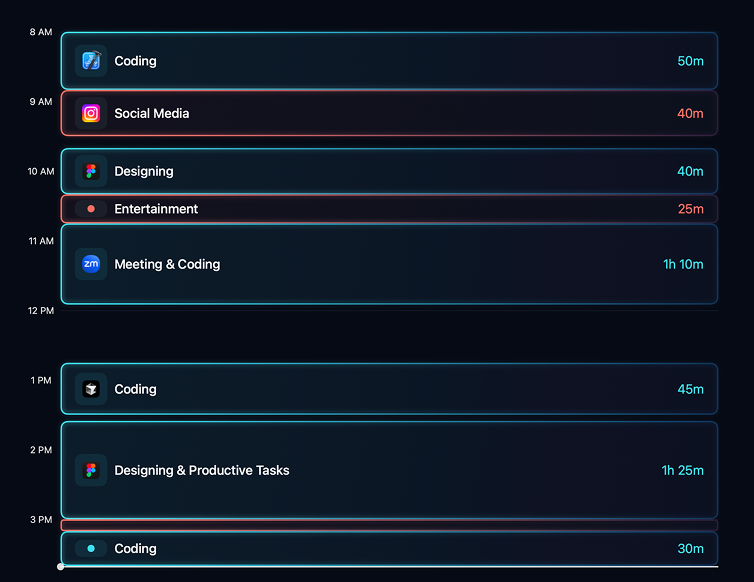
Toki's timeline turns raw app-switching data into a clean, scannable view of your day. Instantly spot where you focused, where you got distracted, and how your energy shifted throughout the day.
-
Color-coded by category
Each app type gets a unique color.
-
Session duration at a glance
See exactly how long you stayed in each app, down to the minute.
-
Real-time updates
The timeline updates live as you work, no refreshing required.
Understand your
productivity patterns
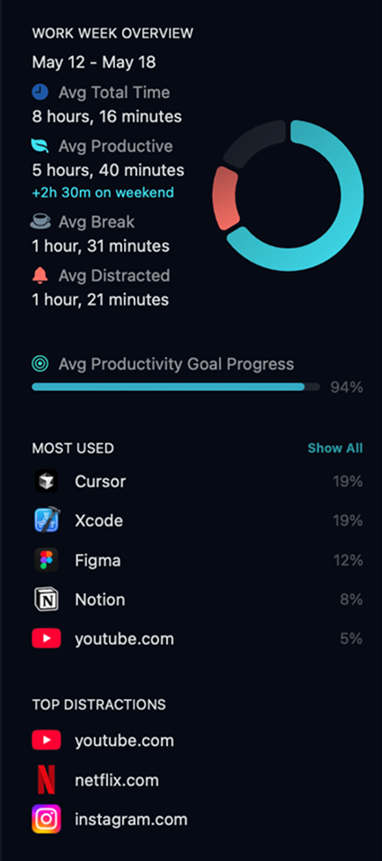
Toki analyzes your data in real-time to show you your most productive hours, which apps consume the most time, and how your focus habits evolve over weeks and months.
-
Workday breakdown
Total time split into productive, break, and distracted buckets.
-
Top tools and distractions ranked
Know exactly which apps you spend the most time on.
-
Productivity goal tracking
Set daily targets and watch your progress fill up in real time.
What people are saying
"I love Toki! I had no idea I was spending 2 hours a day checking e-mails until Toki showed me. It completely changed how I structure my workday."

Software Engineer
"The timeline view is beautiful, and I love seeing my day laid out automatically. It makes it obvious what’s stealing my focus."

UI/UX Designer
"I cancelled my Rize subscription for Toki. One of the main reasons was the one-time purchase. Eight months later, still no regrets."

Founder
"As a freelancer, I need a clear picture of my day, but I manual trackers feel like a chore. Toki gives me that peace of mind to invoice my clients without second-guessing myself."

Freelancer
One price.
Yours forever.
No subscriptions. No hidden fees.
Pay once and own Toki, including all future updates.
 Toki
Toki One-time purchase · All features
USD · one-time
- Automatic time tracking
- Full timeline view
- Productivity analytics & insights
- iCloud Sync across Macs
- Privacy, 100% local data
- 5-day free trial
- All future updates included
- Native Mac performance
No credit card required · Cancel anytime during trial
Questions answered
Toki stores and analyzes your active application and window title. It runs silently in the background, logging every app switch automatically, no timers, no categories, no setup required.
Absolutely. All your data is stored locally on your Mac in an encrypted SQLite database. Nothing is ever sent to any server. If you use iCloud Sync, data is encrypted end-to-end by Apple before it leaves your device.
Not at all. Toki is built natively in Swift and uses under 1% CPU on average. It's incredibly lightweight and has been optimized to have zero impact on your battery or system performance.
The trial gives you full access to every feature in Toki. Automatic tracking, timeline view, analytics, and iCloud Sync. No credit card required. After the trial is over, you decide if you want to purchase.
Never. You pay once and get all future updates for free, forever. As Toki gains new features and improvements, you'll receive them automatically at no additional cost.
Toki is sold through the Mac App Store, so pricing is set by Apple for each region. The price shown on this page is in USD. Your local price may differ slightly due to Apple's regional pricing tiers and local taxes.
Toki requires macOS 13 Ventura or later, supports both Intel and Apple Silicon Macs.
Still have questions?
tokitracker@gmail.com
I'm Donat, the creator of Toki
I'm a software engineer who builds products on the side. I’m obsessed with finding ways to improve my productivity. So, I built this tool to automatically give me the data I need to improve my workflow. I use it every day, and now, I’ve also shared it with you.
5-day free trial · No credit card required